🖥️Polymarket Trading Terminals
Professional execution interfaces for Polymarket • 8 projects found
Polymarket trading terminals are professional-grade interfaces designed for active traders who need speed, multi-market views, and advanced order management. Unlike standard dashboards, terminals support execution — placing trades, managing positions, and monitoring order books across multiple prediction markets simultaneously. Many terminals also support Kalshi and other platforms.
Polymtrade
ActiveMobile-first Polymarket trading terminal with real-time data and AI-style insights to help you act faster.
TREMOR
ActiveComprehensive data terminal for Polymarket and Kalshi prediction markets featuring SQL analytics
future fun
ActiveAION-powered prediction market terminal featuring the Scouter analytics tool with proprietary Edge Score rankings for Polymarket traders.

Kiyotaka
ActiveKiyotaka is an advanced trading analytics platform that provides high-performance order flow charts, order book heatmaps, and programmable market screening tools.

OVERDOG
ActivePolymarket's sports and esports markets in an interface built for a slate — 19 sports by league and fixture, live in-play, plus multi-leg combos and stop orders the exchange has no native way to place
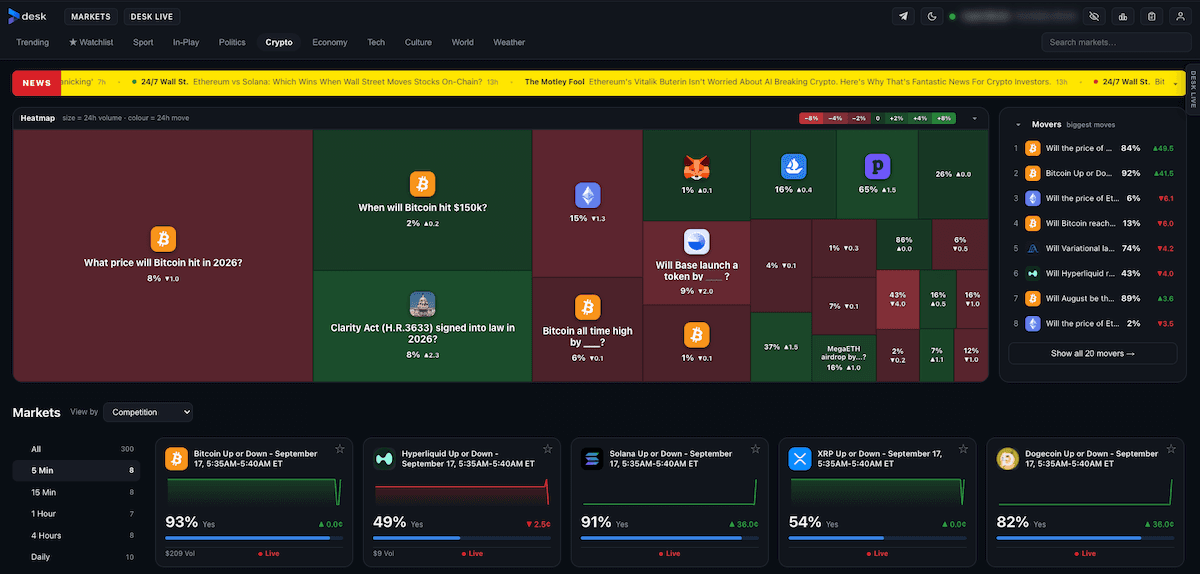
Desk
ActiveThe professional trading terminal for Polymarket — a price ladder, live charts, market depth, one-click positions, exits and automation. Free and no subscription required.
Traderline
ActiveTraderline is a free sports trading terminal for Polymarket: a professional ladder, plus Sonar on-chain market intelligence, live scores, and statistics.
PolyTraderPro
ActivePro trading terminal for Polymarket designed to improve execution speed and usability vs the default interface.
How to Choose a Trading Terminals
- •Execution capability — confirm the terminal supports actual trade placement, not just market monitoring. Some tools marketed as terminals are read-only dashboards.
- •Order type support — professional terminals should handle limit orders, GTC (good-till-cancelled), and conditional orders, not just simple market buys.
- •Multi-market view — the core advantage of a trading terminal is monitoring and trading multiple markets simultaneously. Check how many markets can be displayed at once.
- •Cross-platform support — if you also trade on Kalshi or other prediction markets, look for terminals that support multiple platforms from a single unified interface.
- •Latency and connection reliability — for active trading, check whether the terminal uses direct API connections and how it handles WebSocket reconnections during high-activity periods.
Frequently Asked Questions
What is a Polymarket trading terminal?
A trading terminal is a professional-grade interface for placing trades, managing open orders, and monitoring multiple prediction markets simultaneously. Unlike dashboards, terminals support direct execution and active order management.
Can I trade Polymarket and Kalshi from one terminal?
Yes. Several cross-platform terminals listed above support both Polymarket and Kalshi, letting you monitor odds, compare markets, and execute trades across both prediction market platforms from a single interface.
What is the difference between a Polymarket terminal and a dashboard?
Dashboards are primarily for monitoring and visualization. Terminals add execution capabilities — placing limit or market orders, canceling positions, and managing the order book directly from the interface without switching to another tool.